shareVideo 视频 APP开发接入 Facebook Share 分享SDK能力

用做网页的技术做APP!
一门提供标准化的jsbridge-mini.js库,您只需要在页面引用并执行JS即可实现各种原生APP、原生PC的功能能力。

==================APP端==================
【APP端】(安卓版&苹果版)目前提供200+原生功能,2000+JS映射接口,用做网站的技术即可实现各种原生APP能力、APP demo地址https://www.yimenapp.com/doc/demo.cshtml下载教程:
♦ JS-SDK 引用方式:
♦ 普通网页 script 方式加载:下载最新版,请在页面上调用 jsBridge 接口之前引用 jsbridge-mini.js 库;
♦ js module 方式引用:npm install ym-jsbridge 具体请参考 npm package
一门APP开发平台通用JS

shareVideo 视频 APP开发接入 Facebook Share 分享SDK能力

核心代码示例,详情参阅demo

jsBridge.fbShare.shareVideo({
  //可选的公共参数
  //...
  //描述
  contentDescription: "the description of the video",
  //标题
  contentTitle: "the title to display for this video",
  //预览图 the photo to be used as a preview for the video
  previewPhoto: {
    url    : "https://i.cdn.yimenapp.com/sys/1.jpg",
    caption: "图片说明",
    userGenerated: false
  },
  //视频链接
  videoUrl: "https://flv4mp4.people.com.cn/videofile7/pvmsvideo/2022/2/25/GuiZhouPinDao-TuMin_5905588433c0cefc445c910f6e7f772d.MP4"
}, function(succ, data) {
  if (data.result == "success") {
    alert("成功:" + data.postId);
  } else if (data.result == "cancel") {
    alert("取消");
  } else if (data.result == "error") {
    alert("错误:" + data.message);
  } else {
    alert(JSON.stringify(data));
  }
});

A标签执行JS示例代码

<a href="javascript:void(0)" onclick="zhixing()">执行</a> 
<!-- 写入一个A标签href值为"javascript:void(0)",定义点击事件onclick;-->
<script src="您的服务器URL/jsbridge-mini.js"></script>
<!-- 在您的服务器引入一门JS地址,请下载jsbridge-mini.js上传您自己的服务器获取链接;-->
<script type="text/javascript">
function zhixing() {


<!--这里可以直接复制JS核心代码到此{}括号内-->
jsBridge.fbShare.shareVideo({
  //可选的公共参数
  //...
  //描述
  contentDescription: "the description of the video",
  //标题
  contentTitle: "the title to display for this video",
  //预览图 the photo to be used as a preview for the video
  previewPhoto: {
    url    : "https://i.cdn.yimenapp.com/sys/1.jpg",
    caption: "图片说明",
    userGenerated: false
  },
  //视频链接
  videoUrl: "https://flv4mp4.people.com.cn/videofile7/pvmsvideo/2022/2/25/GuiZhouPinDao-TuMin_5905588433c0cefc445c910f6e7f772d.MP4"
}, function(succ, data) {
  if (data.result == "success") {
    alert("成功:" + data.postId);
  } else if (data.result == "cancel") {
    alert("取消");
  } else if (data.result == "error") {
    alert("错误:" + data.message);
  } else {
    alert(JSON.stringify(data));
  }
});

}
</script>
<!--执行核心代码;
//如果需要进入页面就执行,去掉点击事件即可;-->

按钮执行JS示例代码

<button onclick="zhixing()" >执行</button>
<!-- //写一个按钮,定义点击执行事件; -->
<script src="您的服务器URL/jsbridge-mini.js"></script>
<!-- //在您的服务器引入一门JS地址,请下载jsbridge-mini.js上传您自己的服务器获取链接; -->
<script type="text/javascript">
function zhixing() {


<!--这里可以直接复制JS核心代码到此{}括号内-->
jsBridge.fbShare.shareVideo({
  //可选的公共参数
  //...
  //描述
  contentDescription: "the description of the video",
  //标题
  contentTitle: "the title to display for this video",
  //预览图 the photo to be used as a preview for the video
  previewPhoto: {
    url    : "https://i.cdn.yimenapp.com/sys/1.jpg",
    caption: "图片说明",
    userGenerated: false
  },
  //视频链接
  videoUrl: "https://flv4mp4.people.com.cn/videofile7/pvmsvideo/2022/2/25/GuiZhouPinDao-TuMin_5905588433c0cefc445c910f6e7f772d.MP4"
}, function(succ, data) {
  if (data.result == "success") {
    alert("成功:" + data.postId);
  } else if (data.result == "cancel") {
    alert("取消");
  } else if (data.result == "error") {
    alert("错误:" + data.message);
  } else {
    alert(JSON.stringify(data));
  }
});

}
</script>
<!-- //执行核心代码;
//如果需要进入页面就执行,去掉点击事件即可; -->

sharePhoto 照片 APP开发接入 Facebook Share 分享SDK 实现APP分享到 Facebook 能力

用做网页的技术做APP!
一门提供标准化的jsbridge-mini.js库,您只需要在页面引用并执行JS即可实现各种原生APP、原生PC的功能能力。

==================APP端==================
【APP端】(安卓版&苹果版)目前提供200+原生功能,2000+JS映射接口,用做网站的技术即可实现各种原生APP能力、APP demo地址https://www.yimenapp.com/doc/demo.cshtml下载教程:
♦ JS-SDK 引用方式:
♦ 普通网页 script 方式加载:下载最新版,请在页面上调用 jsBridge 接口之前引用 jsbridge-mini.js 库;
♦ js module 方式引用:npm install ym-jsbridge 具体请参考 npm package
一门APP开发平台通用JS

sharePhoto 照片 APP开发接入 Facebook Share 分享SDK 实现APP分享到 Facebook 能力

核心代码示例,详情参阅demo

jsBridge.fbShare.sharePhoto({
  //可选的公共参数
  //...
  //照片数组
  photos: [
    {
      url    : "https://i.cdn.yimenapp.com/sys/1.jpg",
      caption: "图一的说明",
      //照片是用户还是应用生成的 whether the photo represented by this object was generated by the user or by the application
      //布尔类型
      userGenerated: false
    },
    {
      url    : "https://i.cdn.yimenapp.com/sys/2.jpg",
      caption: "图二的说明",
      userGenerated: false
    },
    {
      url    : "https://i.cdn.yimenapp.com/sys/3.jpg",
      caption: "图三的说明",
      userGenerated: false
    }
  ]
}, function(succ, data) {
  if (data.result == "success") {
    alert("成功:" + data.postId);
  } else if (data.result == "cancel") {
    alert("取消");
  } else if (data.result == "error") {
    alert("错误:" + data.message);
  } else {
    alert(JSON.stringify(data));
  }
});

A标签执行JS示例代码

<a href="javascript:void(0)" onclick="zhixing()">执行</a> 
<!-- 写入一个A标签href值为"javascript:void(0)",定义点击事件onclick;-->
<script src="您的服务器URL/jsbridge-mini.js"></script>
<!-- 在您的服务器引入一门JS地址,请下载jsbridge-mini.js上传您自己的服务器获取链接;-->
<script type="text/javascript">
function zhixing() {


<!--这里可以直接复制JS核心代码到此{}括号内-->
jsBridge.fbShare.sharePhoto({
  //可选的公共参数
  //...
  //照片数组
  photos: [
    {
      url    : "https://i.cdn.yimenapp.com/sys/1.jpg",
      caption: "图一的说明",
      //照片是用户还是应用生成的 whether the photo represented by this object was generated by the user or by the application
      //布尔类型
      userGenerated: false
    },
    {
      url    : "https://i.cdn.yimenapp.com/sys/2.jpg",
      caption: "图二的说明",
      userGenerated: false
    },
    {
      url    : "https://i.cdn.yimenapp.com/sys/3.jpg",
      caption: "图三的说明",
      userGenerated: false
    }
  ]
}, function(succ, data) {
  if (data.result == "success") {
    alert("成功:" + data.postId);
  } else if (data.result == "cancel") {
    alert("取消");
  } else if (data.result == "error") {
    alert("错误:" + data.message);
  } else {
    alert(JSON.stringify(data));
  }
});

}
</script>
<!--执行核心代码;
//如果需要进入页面就执行,去掉点击事件即可;-->

按钮执行JS示例代码

<button onclick="zhixing()" >执行</button>
<!-- //写一个按钮,定义点击执行事件; -->
<script src="您的服务器URL/jsbridge-mini.js"></script>
<!-- //在您的服务器引入一门JS地址,请下载jsbridge-mini.js上传您自己的服务器获取链接; -->
<script type="text/javascript">
function zhixing() {


<!--这里可以直接复制JS核心代码到此{}括号内-->
jsBridge.fbShare.sharePhoto({
  //可选的公共参数
  //...
  //照片数组
  photos: [
    {
      url    : "https://i.cdn.yimenapp.com/sys/1.jpg",
      caption: "图一的说明",
      //照片是用户还是应用生成的 whether the photo represented by this object was generated by the user or by the application
      //布尔类型
      userGenerated: false
    },
    {
      url    : "https://i.cdn.yimenapp.com/sys/2.jpg",
      caption: "图二的说明",
      userGenerated: false
    },
    {
      url    : "https://i.cdn.yimenapp.com/sys/3.jpg",
      caption: "图三的说明",
      userGenerated: false
    }
  ]
}, function(succ, data) {
  if (data.result == "success") {
    alert("成功:" + data.postId);
  } else if (data.result == "cancel") {
    alert("取消");
  } else if (data.result == "error") {
    alert("错误:" + data.message);
  } else {
    alert(JSON.stringify(data));
  }
});

}
</script>
<!-- //执行核心代码;
//如果需要进入页面就执行,去掉点击事件即可; -->

shareLink 链接 Facebook Share 分享 APP开发接入 Facebook Share 分享SDK功能

用做网页的技术做APP!
一门提供标准化的jsbridge-mini.js库,您只需要在页面引用并执行JS即可实现各种原生APP、原生PC的功能能力。

==================APP端==================
【APP端】(安卓版&苹果版)目前提供200+原生功能,2000+JS映射接口,用做网站的技术即可实现各种原生APP能力、APP demo地址https://www.yimenapp.com/doc/demo.cshtml下载教程:
♦ JS-SDK 引用方式:
♦ 普通网页 script 方式加载:下载最新版,请在页面上调用 jsBridge 接口之前引用 jsbridge-mini.js 库;
♦ js module 方式引用:npm install ym-jsbridge 具体请参考 npm package
一门APP开发平台通用JS

shareLink 链接 Facebook Share 分享 APP开发接入 Facebook Share 分享SDK功能

核心代码示例,详情参阅demo

jsBridge.fbShare.shareLink({
  //其他公共参数
  //...
  //话题 the ShareHashtag for this content
  hashtag   : "#UkraineCrisis",
  //链接 the URL for the content being shared
  contentUrl: "https://m.baidu.com",
  //引用 the quote to display for this link
  quote     : "Connect on a global scale."
}, function(succ, data) {
  if (data.result == "success") {
    alert("成功:" + data.postId);
  } else if (data.result == "cancel") {
    alert("取消");
  } else if (data.result == "error") {
    alert("错误:" + data.message);
  } else {
    alert(JSON.stringify(data));
  }
});

/*
所有分享接口都支持的公共参数
{
    //链接 the URL for the content being shared
    //可选,字符串
    contentUrl: "https://m.baidu.com",
    //标记人 the list of Ids for taggable people to tag with this content
    //可选,字符串数组
    peopleIds : [],
    //位置 the Id for a place to tag with this content
    //可选,字符串
    placeId   : "",
    //页面 the Id of the Facebook page this share is associated with
    //可选,字符串
    pageId    : "",
    //the value to be added to the referrer URL when a person follows a link from this shared content on feed
    //可选,字符串
    ref       : "",
    //话题 the ShareHashtag for this content
    //可选,#号开头的字符串
    hashtag   : ""
}
*/

A标签执行JS示例代码

<a href="javascript:void(0)" onclick="zhixing()">执行</a> 
<!-- 写入一个A标签href值为"javascript:void(0)",定义点击事件onclick;-->
<script src="您的服务器URL/jsbridge-mini.js"></script>
<!-- 在您的服务器引入一门JS地址,请下载jsbridge-mini.js上传您自己的服务器获取链接;-->
<script type="text/javascript">
function zhixing() {


<!--这里可以直接复制JS核心代码到此{}括号内-->
jsBridge.fbShare.shareLink({
  //其他公共参数
  //...
  //话题 the ShareHashtag for this content
  hashtag   : "#UkraineCrisis",
  //链接 the URL for the content being shared
  contentUrl: "https://m.baidu.com",
  //引用 the quote to display for this link
  quote     : "Connect on a global scale."
}, function(succ, data) {
  if (data.result == "success") {
    alert("成功:" + data.postId);
  } else if (data.result == "cancel") {
    alert("取消");
  } else if (data.result == "error") {
    alert("错误:" + data.message);
  } else {
    alert(JSON.stringify(data));
  }
});

/*
所有分享接口都支持的公共参数
{
    //链接 the URL for the content being shared
    //可选,字符串
    contentUrl: "https://m.baidu.com",
    //标记人 the list of Ids for taggable people to tag with this content
    //可选,字符串数组
    peopleIds : [],
    //位置 the Id for a place to tag with this content
    //可选,字符串
    placeId   : "",
    //页面 the Id of the Facebook page this share is associated with
    //可选,字符串
    pageId    : "",
    //the value to be added to the referrer URL when a person follows a link from this shared content on feed
    //可选,字符串
    ref       : "",
    //话题 the ShareHashtag for this content
    //可选,#号开头的字符串
    hashtag   : ""
}
*/

}
</script>
<!--执行核心代码;
//如果需要进入页面就执行,去掉点击事件即可;-->

按钮执行JS示例代码

<button onclick="zhixing()" >执行</button>
<!-- //写一个按钮,定义点击执行事件; -->
<script src="您的服务器URL/jsbridge-mini.js"></script>
<!-- //在您的服务器引入一门JS地址,请下载jsbridge-mini.js上传您自己的服务器获取链接; -->
<script type="text/javascript">
function zhixing() {


<!--这里可以直接复制JS核心代码到此{}括号内-->
jsBridge.fbShare.shareLink({
  //其他公共参数
  //...
  //话题 the ShareHashtag for this content
  hashtag   : "#UkraineCrisis",
  //链接 the URL for the content being shared
  contentUrl: "https://m.baidu.com",
  //引用 the quote to display for this link
  quote     : "Connect on a global scale."
}, function(succ, data) {
  if (data.result == "success") {
    alert("成功:" + data.postId);
  } else if (data.result == "cancel") {
    alert("取消");
  } else if (data.result == "error") {
    alert("错误:" + data.message);
  } else {
    alert(JSON.stringify(data));
  }
});

/*
所有分享接口都支持的公共参数
{
    //链接 the URL for the content being shared
    //可选,字符串
    contentUrl: "https://m.baidu.com",
    //标记人 the list of Ids for taggable people to tag with this content
    //可选,字符串数组
    peopleIds : [],
    //位置 the Id for a place to tag with this content
    //可选,字符串
    placeId   : "",
    //页面 the Id of the Facebook page this share is associated with
    //可选,字符串
    pageId    : "",
    //the value to be added to the referrer URL when a person follows a link from this shared content on feed
    //可选,字符串
    ref       : "",
    //话题 the ShareHashtag for this content
    //可选,#号开头的字符串
    hashtag   : ""
}
*/

}
</script>
<!-- //执行核心代码;
//如果需要进入页面就执行,去掉点击事件即可; -->

云端APP开发平台有那些,推荐一门APP开发平台

云端APP开发平台有那些,推荐一门APP开发平台

移动应用迅速制作官方 Phonegap或Xamarin与一门APP的最大区别?

普通人了解到移动应用迅速制作官方,通常都是从国外的Phonegap来的。

毕竟Phonegap在这个领域中最出名的一种。

近几年,国内也出现了许多移动应用迅速制作官方,如本文要写到的一门APP。

这么一样是移动应用迅速制作官方,Phonegap和一门APP的最大区别在哪里呢?

Phonegap app迅速制作官方简介

PhoneGap 是一款HTML五官方,通过它,制作商能够使用HTML、CSS及Javwebapp开发工具aScript来制作本地APP程序。

所以,现在制作商能够只 编写一次应用程序,然后在七个核心的移动官方和应用程序商店(app store)里进行发布,这些移动官方和应用程序商店包括:iOS、Android等。

此外PhoneGap拥有丰富的插件,能够以此扩展无限的功能。

一门APP简介

一门APP是中国领先的“云端一体”的APP云服务提供商。

一门APP推行“云端一体”的理念,重新定义了APP制作。

一门APP为制作者从“云”和“端”两个方向提供API,简化APP制作技术,让APP的制作时间周期从一种月缩短到七天。

一门APP由“云API”和“端API”两部分组成,能够帮忙助力制作者迅速实现APP的制作、测试、发布、管理和运营的全生命时间周期管理。

Phonegap与一门APP的区别

这里写太多文字也看不清楚,小明直接做了张图,从各个方面将phonegap和一门APP进行对比。

Phonegap优势

PhoneGap针对不同官方的WebView做了扩展和打包,使WebView这个组件变成可访问设备本地API的强大浏览器,因此h5app开发工具制作人工在PhoneGap框架下可通过JavaScript访问设备本地API,实现WebView与SDK API双向通信。

但PhoneGap所体现的混合类型的应用还不能完全取代原生应用,在一些复杂的API调用或者涉及高性能计算的应用制作上,原生应用还是框架app唯一的选用。

除此以外的大多数场合,混合类型的应用以很小的性能牺牲为代价,带来了大幅的灵活性和制作效率。

用PhoneGap平台的一句话概况其特点是:“wri

tten once,run everywhere”——一次编译到处运行。

移动应用迅速制作官方 一门APP优势

(1)方式完整,简化,上手快。

是因为有Phonegap的基础,了解概念花了不到两个小时,做出首先个小App花了一天半。

(二)IDE整合做的不错,直接连接云端,SVN代码同步,直接连接手机App Loader真机调试,Log能够通过IDE输出,比模拟器真实,直观。

(三)云编译很方便,跨官方封装,直接生成2维码,我的小App做完封装,直接发2维码给朋友用。

(四)手机底层硬件/组件调用API很实用,测了一些,比如语音识别,都不错。

(五)文档完备,相比开源项目往往缺乏文档,信息想要东拼西凑来看,一门APP的文档比较集中和全面。

网站APP打包Facebook分享

图:Facebook

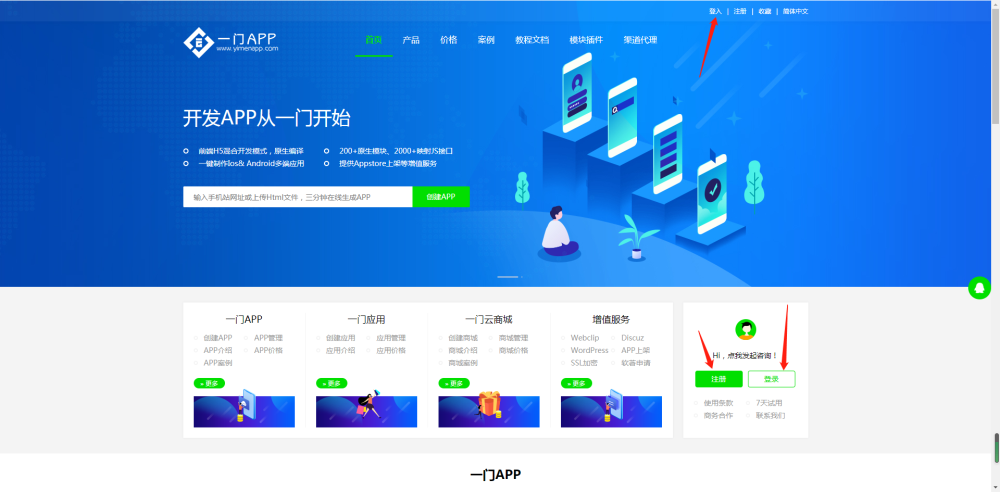
网站APP打包也是可以配置Facebook分享功能的,选用一门APP打包平台封装你的移动应用,登录一门APP开发者中心即可配置该功能;

图:登录一门APP开发者中心

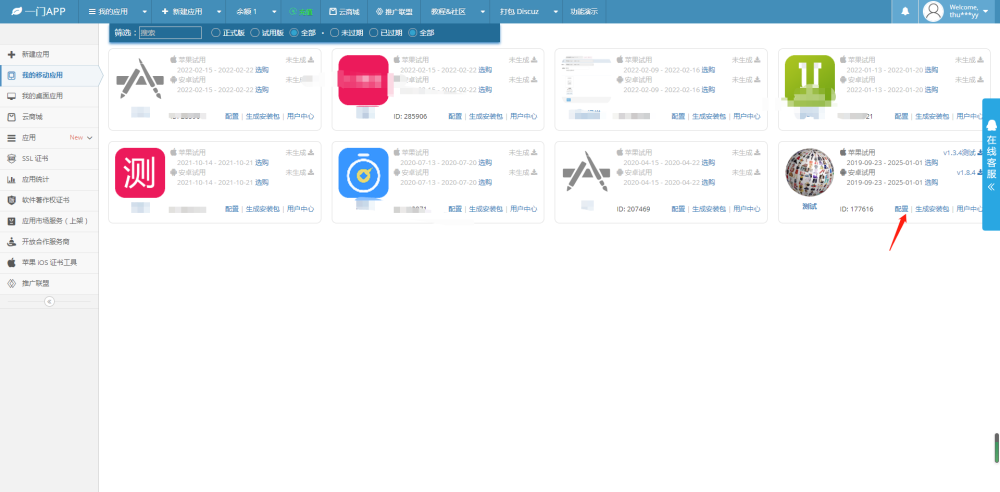
登录一门APP开发者中心之后,找到你需要配置Facebook分享功能的移动应用,点击配置按钮即可配置移动版页面;

图:找到需要配置Facebook分享功能的应用

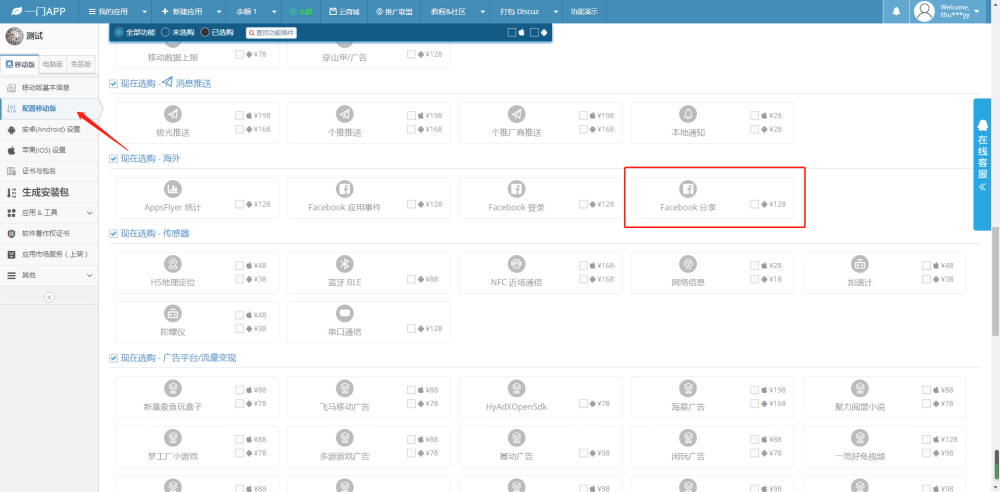
进入一门APP打包平台的配置移动版页面之后,找到Facebook分享功能;

图:找到Facebook分享功能

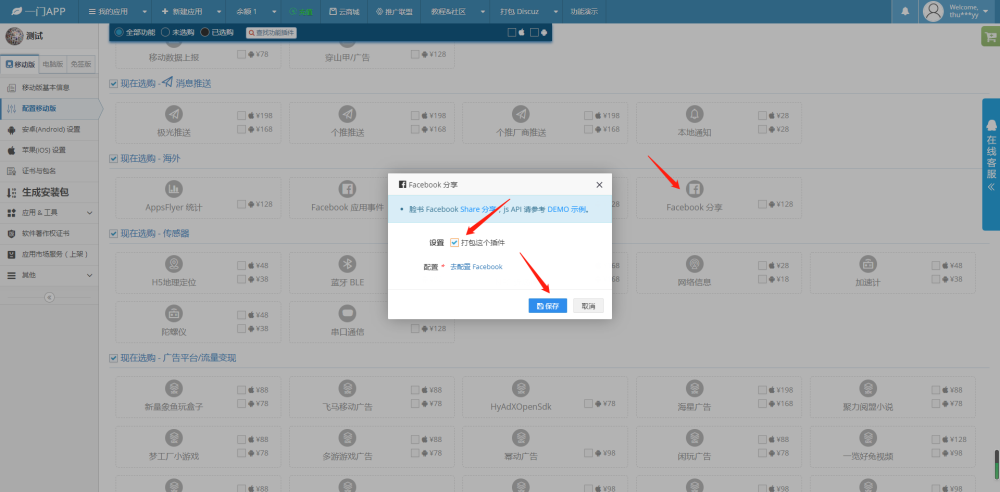
找到Facebook分享功能之后,鼠标左键点击该功能弹出配置页面之后去勾选打包这个插件并保存;

图:勾选打包Facebook分享插件

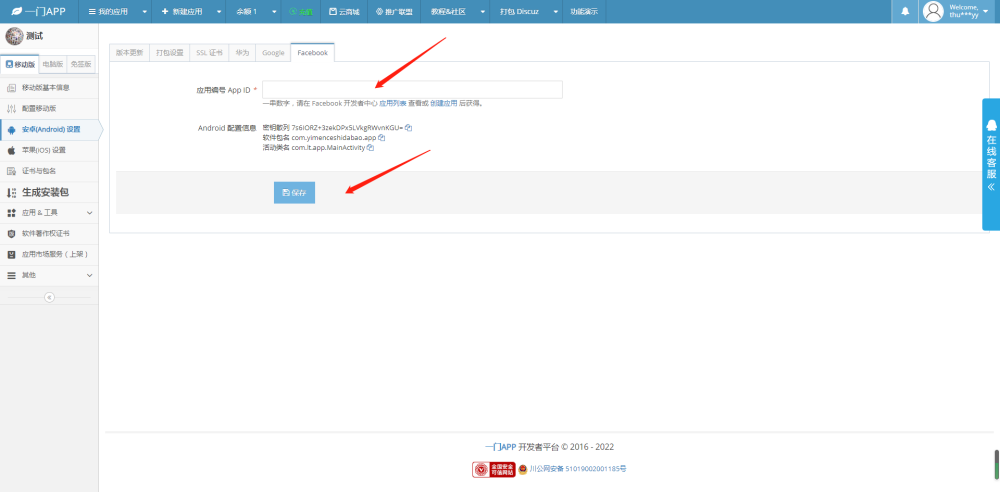
在配置页面中需要去配置一下Facebook的应用编号APPID并保存;

图:配置Facebook应用编号APPID

由于Facebook分享功能属于离线配置功能,所以配置后需要重新生成新版的安装包下载安装新版才能生效;配置Facebook分享功需要二次开发引用我们的js,可以参考我们的demo示例,如果你在配置Facebook分享功能的时候没有技术能力实现二次开发,可以联系我们这边的在线客服付费给我们帮你完成Facebook分享功能的二次开发;

目前Facebook分享功能只支持安卓版,如果需要接入苹果版Facebook分享可以联系我们在线客服定制该功能。